
By Rahul Dhakate · PMP Certified · May 2026 · learnxyz.in
The Work Breakdown Structure — WBS — is one of the most fundamental planning tools in project management. It is also one of the most misunderstood. Many project managers create something they call a WBS that is actually a task list, a Gantt chart, or a project schedule. These are related things, but they are not a WBS.
Contents
What is a WBS in Project Management? PMP Guide With Real Example
What is a Work Breakdown Structure?
WBS Decomposition Approaches — How to Break Down the Work
Work Packages — The Bottom of the WBS
A Real WBS Example: eCommerce Platform Project
WBS vs Project Schedule — A Critical Distinction
This article explains exactly what a WBS is, what it is not, how to build one correctly, and why the PMP exam cares about it in specific ways that candidates often get wrong. I will also share a real example from my own experience — building a WBS as part of a project planning exercise — that demonstrates how skills-based decomposition works in practice.
What is a Work Breakdown Structure?
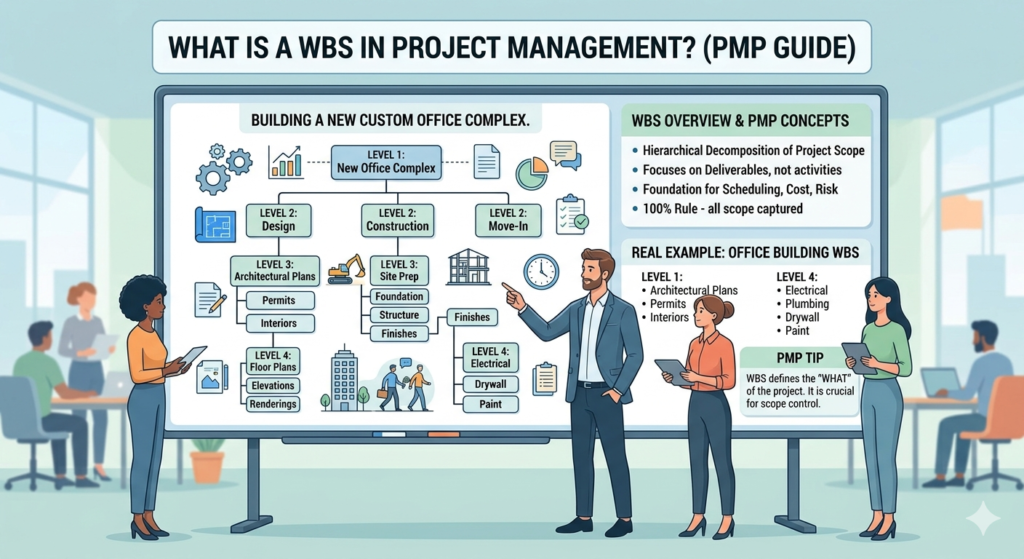
A Work Breakdown Structure is a hierarchical decomposition of the total scope of work required to complete a project and achieve its objectives. The WBS breaks the project down into progressively smaller and more manageable components until the work is defined at a level detailed enough to be planned, estimated, monitored, and controlled.
Three words in that definition are critical: hierarchical, decomposition, and scope.
- Hierarchical means the WBS is structured in levels — the project at the top, major deliverables below, then sub-deliverables, then work packages at the bottom
- Decomposition means breaking something large into smaller parts — not listing tasks, but breaking down deliverables into their component pieces
- Scope means the WBS represents what the project will produce — deliverables and outcomes — not the activities required to produce them
The most important rule in WBS creation: the WBS represents deliverables and outcomes, not activities. ‘User Authentication Module’ is a WBS element. ‘Write login code’ is an activity — it belongs in the activity list that is derived from the WBS, not in the WBS itself.
The 100% Rule
The fundamental quality test for any WBS is the 100% Rule: the WBS must capture 100% of the project scope. Every deliverable that the project will produce must appear somewhere in the WBS. Equally, nothing that is outside the project scope should appear in the WBS.
This rule applies at every level of the hierarchy. The child elements at any level must together equal 100% of their parent element — no more and no less. If you break ‘Authentication Module’ into three sub-components and those three components together equal the full scope of the authentication module, the 100% rule is satisfied at that level.
The 100% Rule is what prevents scope creep from being embedded in the planning process. If work appears in the WBS that was not in the approved scope, that is a scope change — not a planning detail.
WBS Decomposition Approaches — How to Break Down the Work
There is no single correct way to structure a WBS. The decomposition approach depends on the nature of the project, the team structure, and what makes most sense for planning and control. Three common approaches are:
By Phase
The WBS top level reflects the project lifecycle phases — Initiation, Design, Development, Testing, Deployment. Each phase is then broken into its deliverables. This approach works well for waterfall projects with clearly defined phases.
By Deliverable
The WBS top level reflects the major products or deliverables the project will produce — Authentication Module, Database Layer, Reporting Engine, Admin Console. Each deliverable is then broken into its sub-components. This approach works well for product development projects.
By Team or Skill
The WBS reflects the team structure — Frontend Team deliverables, Backend Team deliverables, QA Team deliverables, DevOps deliverables. Each team’s scope is then broken into the specific components they are responsible for.
In my own experience building a WBS for a project planning exercise, I used the skills-based decomposition approach — breaking the work according to the team members available and the skills they possessed. This had an immediate practical advantage: it made work allocation straightforward, because each WBS element mapped directly to a person or a team with the right capability. Getting the right work to the responsible person within the stipulated time was the direct outcome.
For the PMP exam, the deliverable-based approach is most commonly referenced. But understanding that multiple decomposition approaches exist — and knowing when each is appropriate — is itself a testable concept.
Work Packages — The Bottom of the WBS
The lowest level of any WBS branch is called a work package. A work package is a unit of work that can be:
- Scheduled — you can estimate how long it will take
- Cost-estimated — you can predict how much it will cost
- Assigned — it can be assigned to a specific person or team
- Monitored — its completion can be tracked and measured
Work packages are not individual tasks. A work package may contain multiple tasks — the specific actions required to produce the deliverable represented by the work package. The relationship is: WBS → Work Packages → Activities.
The WBS Dictionary is a companion document that defines each WBS element in detail — description, responsible owner, acceptance criteria, and assumptions. On larger projects, the WBS Dictionary is essential for ensuring everyone has the same understanding of what each element contains.
A Real WBS Example: eCommerce Platform Project
Below is a sample WBS for a software project — structured by deliverable, which is the most common format on the PMP exam. This mirrors the type of project planning I have done across multiple software delivery engagements.
| Level | WBS ID | WBS Element | Description / Deliverable |
| 1 | 1.0 | eCommerce Platform | Total project scope — 100% of all deliverables |
| 2 | 1.1 | Authentication & User Management | All login, registration, role management deliverables |
| 3 | 1.1.1 | Login Module | Login screen, session management, token handling |
| 3 | 1.1.2 | Registration & Onboarding | Sign-up flow, email verification, profile setup |
| 3 | 1.1.3 | Role-Based Access Control | Admin, seller, buyer role definitions and permissions |
| 2 | 1.2 | Product Catalogue | All product listing, search, and display deliverables |
| 3 | 1.2.1 | Product Listing Pages | Individual product pages with pricing, images, specs |
| 3 | 1.2.2 | Search & Filter Engine | Keyword search, category filter, sort functionality |
| 3 | 1.2.3 | Inventory Management Module | Stock tracking, low-stock alerts, SKU management |
| 2 | 1.3 | Checkout & Payments | All cart, checkout, and payment processing deliverables |
| 3 | 1.3.1 | Shopping Cart | Add to cart, quantity update, cart persistence |
| 3 | 1.3.2 | Payment Gateway Integration | Card payment, UPI, wallet integration via payment API |
| 3 | 1.3.3 | Order Confirmation & Receipts | Order confirmation screen, email receipt, order ID |
| 2 | 1.4 | Admin Console | Back-office management tools for platform administrators |
| 3 | 1.4.1 | Vendor Management Dashboard | Vendor onboarding, commission management, status |
| 3 | 1.4.2 | Reporting & Analytics | Sales reports, traffic analytics, inventory reports |
| 2 | 1.5 | Quality Assurance | All testing deliverables across all modules |
| 3 | 1.5.1 | Test Plans & Test Cases | Documented test plans for each module |
| 3 | 1.5.2 | UAT Sign-off Documentation | Client-signed acceptance for each module |
| 2 | 1.6 | Deployment & Handover | Production deployment and documentation deliverables |
| 3 | 1.6.1 | Production Deployment Package | Deployed, live application on production server |
| 3 | 1.6.2 | Technical Documentation | Architecture docs, API docs, runbook |
Notice what is not in this WBS: no tasks, no durations, no assigned names, no dates. The WBS is purely scope — what will be delivered. Tasks, durations, and assignments come from the activity planning that follows WBS creation.
WBS vs Project Schedule — A Critical Distinction
This distinction is one of the most frequently tested on the PMP exam, and one of the most commonly confused in practice.
| WBS | Project Schedule |
| Represents WHAT will be delivered | Represents WHEN and HOW LONG it will take |
| Contains deliverables and work packages | Contains activities, durations, and dates |
| Has no time dimension | Is entirely time-based |
| Created during scope planning | Created during schedule planning — after WBS |
| Tool: WBS chart or outline | Tool: Gantt chart, network diagram, MS Project |
At Ebix, we used Microsoft Project for project management — but its use was primarily at the scheduling and team management level, not deep WBS construction. The WBS thinking was done upfront in planning, and MS Project was used to track work against the schedule that derived from it. This is typical of how most organisations use PM tools in practice.
How the PMP Exam Tests WBS
The WBS appears on the PMP exam in four main question patterns:
- Definition questions: What is the purpose of the WBS? Answer: to decompose project scope into manageable work packages.
- 100% Rule questions: A WBS is shown and you are asked whether it is correct. Check that child elements sum to 100% of their parent. Check that no activities appear — only deliverables.
- WBS vs Schedule questions: A question describes something that sounds like a WBS but contains durations or dependencies. This is a schedule, not a WBS.
- Scope creep questions: Work is added to the project that is not in the WBS. The correct PMI response is to evaluate it through the change control process — not to simply add it to the WBS.
PMP exam trap: Some questions will describe a WBS that includes activities (things you do) rather than deliverables (things you produce). This is always incorrect in PMI’s framework. The WBS should contain nouns, not verbs. ‘Authentication Module’ is correct. ‘Develop authentication module’ is an activity — it belongs in the activity list, not the WBS.
About the Author
Rahul Dhakate is a PMP-certified project manager and product management leader based in Nagpur, India, with 20 years of experience managing software projects across BFSI, eCommerce, and enterprise software. He has built WBS structures across software delivery projects, using skills-based decomposition to align deliverables with team capabilities and ensure clear ownership at every level. He writes at LearnXYZ.in to help working professionals understand both the theory and the real-world practice of project management.