By Rahul Dhakate · PMP Certified · May 2026 · learnxyz.in
If you have been studying for the PMP exam and come across both the terms ‘float’ and ‘slack’, you are probably wondering whether they mean the same thing, whether one is better than the other, or whether the exam will test them differently.
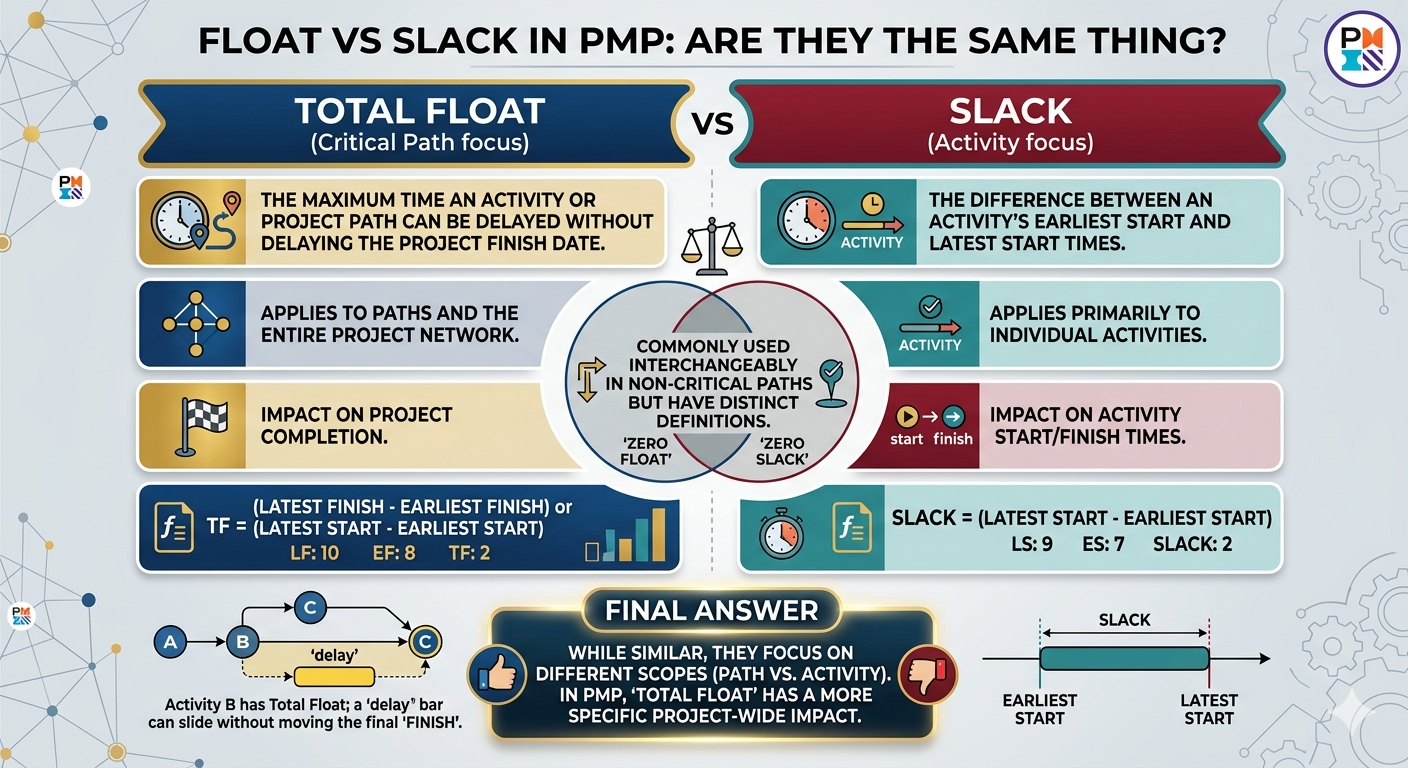
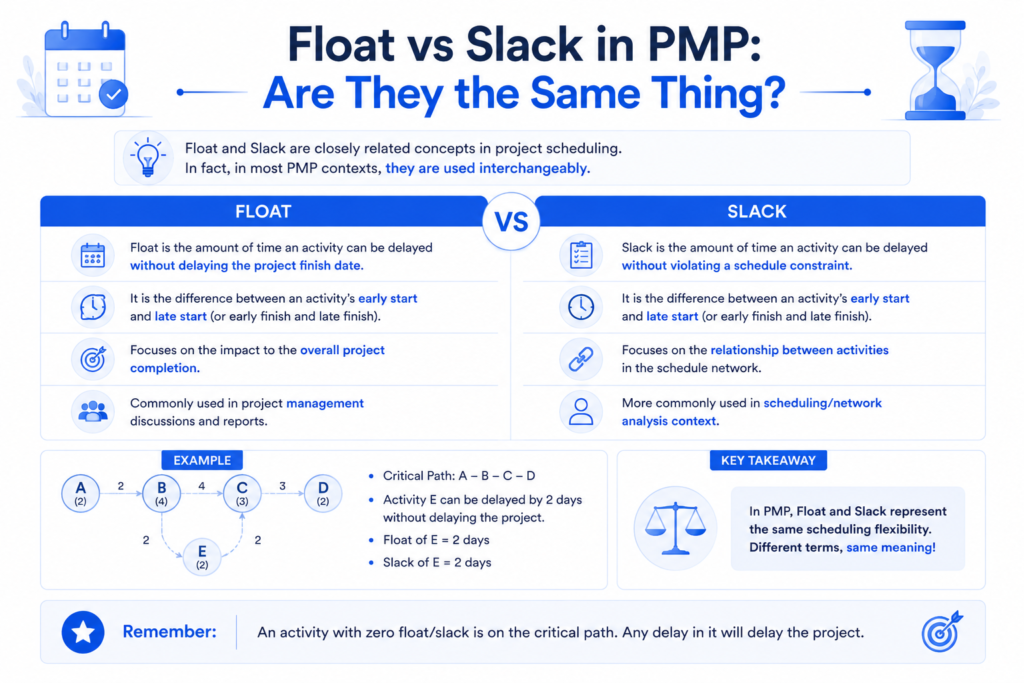
Here is the short answer: in PMI’s framework and on the PMP exam, float and slack are used interchangeably. They refer to the same concept — the amount of time an activity can be delayed without delaying something else. The PMBOK Guide uses ‘float’ as its primary term, but ‘slack’ appears in common practice and in some scheduling tools, and the exam may use either.
That said, there are important distinctions within the concept of float itself that the exam tests specifically — and understanding those is where most candidates need to focus. Let me explain all of it clearly.
Table of Contents
Float vs Slack in PMP: Are They the Same Thing?
Total Float vs Free Float — The Distinction That Matter
A Real Example: UI Optimisation Slipping Into Its Float
Negative Float — What It Means and Why It Matters.
What is Float?
Float (also called slack) is the amount of time a scheduled activity can be delayed or extended without causing a delay to a successor activity or to the project’s overall finish date.
Float is a product of the scheduling network — it emerges from the relationships between activities and the length of different paths through the network. Activities on the critical path have zero float. Activities on non-critical paths have positive float.
Understanding float matters because it tells you where you have scheduling flexibility and where you do not. As a project manager, you use float information to make decisions about resource allocation, risk prioritisation, and schedule compression.
Total Float vs Free Float — The Distinction That Matters
Within the concept of float, PMI distinguishes between two types. This is the distinction the exam tests, so understanding both clearly is essential.
Total Float
Total Float is the amount of time an activity can be delayed without delaying the project’s overall finish date. It measures flexibility relative to the end of the project.
Total Float is calculated as: Late Start minus Early Start (or equivalently, Late Finish minus Early Finish) — the same calculation you use in the backward and forward pass of the critical path method.
Total Float = Late Start − Early Start (or) Late Finish − Early Finish
If Activity C has a Total Float of 9 days, it means you can delay Activity C by up to 9 days before the project end date is affected. This is what most people mean when they say an activity ‘has float.’
Free Float
Free Float is the amount of time an activity can be delayed without delaying the Early Start of any immediately following (successor) activity. It measures flexibility relative to the next task — not the end of the project.
Free Float = Early Start of successor − Early Finish of the activity
Free Float is always less than or equal to Total Float for any given activity. You cannot have more free float than total float — because if delaying an activity delays its successor, it is also potentially delaying the project.
| Type | Measures Delay Without Affecting… | Relative To | Can Be Negative? |
| Total Float | Project end date | Project finish | Yes — if project is behind schedule |
| Free Float | Successor activity’s Early Start | Next task in sequence | No — always zero or positive |
Exam shortcut: when a question asks about float without specifying which type, assume Total Float — it is the default meaning in most scheduling contexts and the most commonly tested variant.
A Real Example: UI Optimisation Slipping Into Its Float
Let me share a scheduling situation from a real project that illustrates exactly how float works in practice — and what happens when a non-critical task starts consuming its available time.
On a software delivery project, we had a UI optimisation task — refining interface responsiveness, visual consistency, and load performance. This work was genuinely non-critical at the start of the project. It sat on a non-critical path and had float available, which meant it could be deferred and done closer to the delivery date without impacting the overall timeline.
However, as the project progressed and the team’s attention was focused on critical path deliverables, the UI optimisation task was continuously deprioritised. When we finally came back to it — close to the delivery date — the task had consumed its entire float through elapsed time alone. It was now a critical task. We had to complete it urgently before delivery, compressing what should have been relaxed optimisation work into a pressured final sprint.
This is one of the most common real-world scheduling problems: non-critical tasks that are repeatedly deferred until their float is exhausted, at which point they become urgent and disruptive. Good project managers monitor float consumption throughout the project — not just at planning.
Float is not a permanent buffer. It is a time bank that depletes as days pass. A non-critical task with 10 days of float today has 9 days of float tomorrow if you do nothing. Monitor it actively.
Negative Float — What It Means and Why It Matters
Negative float occurs when an activity’s late finish is earlier than its early finish — meaning the current schedule is mathematically impossible to complete on time. Negative float signals that the project is already behind schedule.
You will encounter negative float in scheduling tools like MS Project when constraints are imposed on tasks — for example, when a deadline is fixed and the current trajectory of the project exceeds that deadline. The scheduling tool shows negative float values as a visual warning that the schedule needs attention.
We used Microsoft Project at Ebix, primarily for managing team workloads and tracking schedule progress. While its use was not always at the level of deep CPM analysis, the float visibility it provided — which tasks had buffer and which were critical — was useful for making resource allocation decisions. When float values started dropping toward zero on tasks we expected to have buffer, it was a reliable early warning signal.
PMP exam trap: negative float does not mean a task can run backwards. It means the project is behind schedule and the current plan cannot deliver on the committed date. The correct response is to take corrective action — compress the schedule, add resources, or negotiate the deadline.
Float and Resource Levelling
Float plays a direct role in resource levelling — the process of adjusting a schedule to address resource constraints without extending the project end date.
When two tasks compete for the same limited resource, the project manager can use float to delay the non-critical task until the resource is available, without impacting the project finish date. The float gives you the scheduling flexibility to make this adjustment.
This is why float information is practically valuable beyond just understanding the critical path. It tells you exactly how much flexibility you have to make resource decisions, and which tasks can absorb those decisions without consequence.
Float in Agile Projects
The concept of float is primarily associated with predictive (Waterfall) project management and CPM scheduling. In Agile projects, work is not typically planned as a network of dependent activities with calculated float values.
However, the underlying concept — that some work has more flexibility than other work — exists in Agile environments as backlog prioritisation. High-priority backlog items are the Agile equivalent of critical path tasks: they must be addressed first because everything else depends on them. Lower-priority items have more scheduling flexibility — Agile float, conceptually.
For the PMP exam, float questions are almost always in the context of predictive scheduling. If a question is clearly in an Agile context, it will not typically ask about float calculations.
How Float Is Tested on the PMP Exam
- Calculation questions: Given ES, EF, LS, LF values for an activity, calculate its Total Float or Free Float. Apply the formulas directly.
- Terminology questions: Is float the same as slack? Answer: yes, they are used interchangeably in PMI’s framework.
- Critical path questions: Tasks on the critical path have zero float. Any task with positive float is not on the critical path. Any task with negative float means the project is behind schedule.
- Scenario questions: A non-critical task is delayed. Does this delay the project? Only if the delay exceeds the task’s available float. If the delay is within the float, the project end date is unaffected.
- Float consumption questions: A task has 5 days of float and is delayed by 7 days. The project end date shifts by 2 days (the 2 days that exceeded the available float).
The cleanest way to master float for the exam: do ten CPM problems from scratch, calculating forward pass, backward pass, and float for every activity. After ten complete problems, float calculation becomes automatic. The concept will never confuse you again.
About the Author

Rahul Dhakate is a PMP-certified project manager and product management leader based in Nagpur, India, with 20 years of experience managing software projects across BFSI, eCommerce, and enterprise software. He monitored schedule float across multiple software delivery projects using MS Project, and experienced firsthand how deferred non-critical tasks can exhaust their float and become last-minute delivery risks. He writes at LearnXYZ.in to help working professionals understand both the theory and the real-world practice of project management.
Good Reads: